Moodle - Recycle bin (staff/faculty)
- Lauren HalcombSmith (Deactivated)
- Zac Macdonald
- Jason 1keddie
The Recycle Bin feature allows instructors to restore activities and resources that have been deleted. Activities and resources that have been deleted will stay in the Recycle bin for 72 hours (3 days) before being permanently deleted.
To use the Recycle Bin, follow the step-by-step instructions below.
1. Turn editing on
To delete an activity or resource, editing must be turned on in with the Editing mode on/off button in the top right of your course.

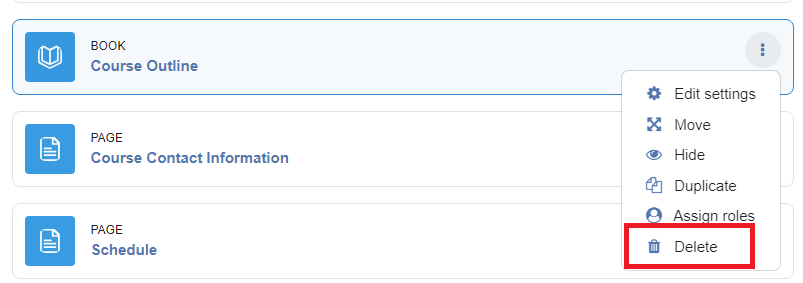
2. Select the Edit drop down menu & delete item
Once editing is turned on, you can delete a resource or activity by selecting the three dot drop-down menu and clicking delete:
3. Select Recycle Bin in Course Admin block
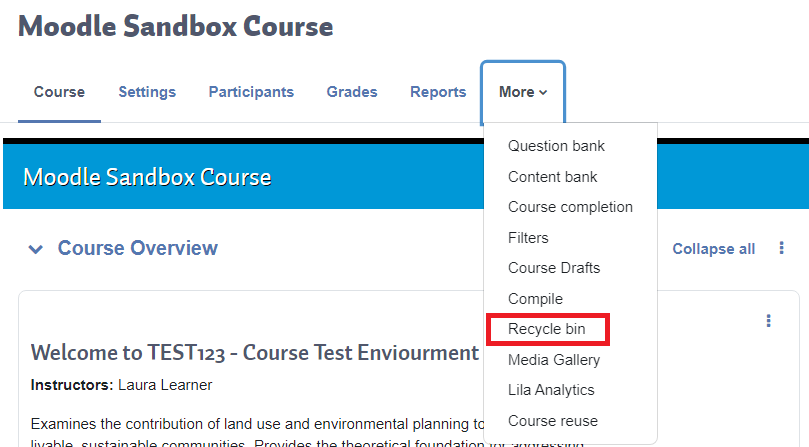
To access deleted items, Select More on the top course menu and find the the Recycle Bin.
4. Wait approx 1 minute
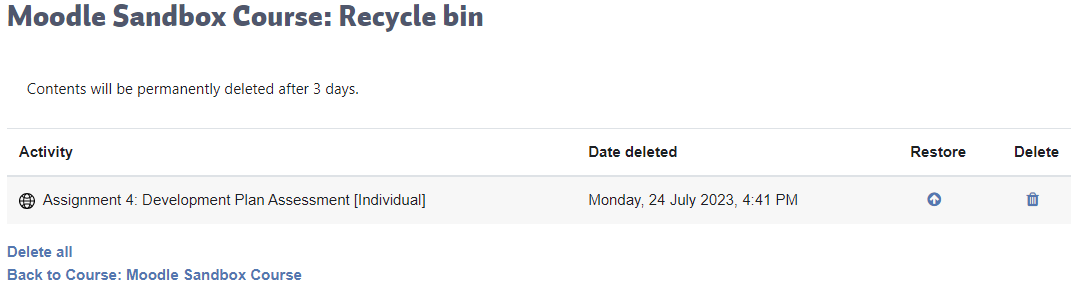
Clicking the Recycle Bin will take you to a new screen, showing all items that have been recently deleted. NOTE: it will take about a minute for deleted items to appear in the Recycle Bin and you may need to refresh the page.
5. Click Restore to recover
To restore an item in the Recycle Bin, click Restore. The item will automatically be returned to its original location.
/restore-bin.png)
6. Click Delete + confirm to delete forever
To delete an item forever, click Delete:
/delete-bin.png)
You will be asked to confirm this operation. NOTE: Once an item has been deleted from the Recycle Bin, it cannot be restored.
/delete-confirmation.png)
Note: Items that have been in the Recycle bin for more than 72 hours (3 days) will automatically be deleted forever.

Content on this page is licensed under a Creative Commons Attribution-ShareAlike 4.0 International license.
Related content
How to Contact the Computer Services Department
Submit a ticket
To submit a ticket, you will be required to log in using your FULL Royal Roads email address (detailed instructions here)
New! If you do not have a full RRU email address (students not currently in a credit program and/or visitors), you can create a portal account using your personal email address.
Email us at IT Customer Service
Contact Form
Phone: 250-391-2659 Toll Free: 1-866-808-5429
Come visit us in the Sequoia Building
Hours of Operation